Skip to content

Indicators

Make smarter decisions with leading indicators.

Track the smart money in real time.

See plans and prices

HFT Indicator Automation Mode

Nifty 50 Index · 1 min · NSE
HFT Indicator Automation Mode
Interactive chart rebuilt from a TradingView export: Nifty 50, 1 minute, 6 to 9 November 2026, with the indicator's Buy and Sell labels, its dynamic resistance (red) and support (green) lines, and its four options flows below. Hover or tap for each candle and its flows; drag or pinch to move. A past chart, not a signal or a recommendation.

Two scripts: one for manual trading, the other for automation.

01 For manual trading

TradingView indicator

HFT Algo Scanner

The main options flow scanner, built for traders who trade by hand. It estimates call and put buying and writing across several strikes around the price and shows it as four coloured columns under the chart.

  • Four flow columns: call buying, call writing, put buying and put writing
  • Buy and Sell labels with a strength filter, and a Fund Flow table
  • Invite only access on your TradingView account

Read the full guide
HFT Algo Scanner on a 1 minute Nifty chart: Buy and Sell labels with strength values, green and red background shading, and the four coloured flow columns with the Fund Flow table in the pane below.
02 For automation

TradingView indicator

HFT Indicator Automation Mode

The edition built for automation. The same options flow view with less noisy signals, dynamic support and resistance lines, and alerts made to drive orders through your broker's automation or Vyuh.

  • The same four flow columns as the HFT Algo Scanner
  • Buy, Sell, dynamic support and dynamic resistance alerts, built for automation
  • Invite only access on your TradingView account
Read the full guide
HFT Indicator Automation Mode on a 1 minute Nifty chart: Buy and Sell labels on the candles, horizontal price lines, the four coloured flow columns in the pane below, and a Fund Flow table and a symbol table on the right.

Two scripts, one way of reading the chart.

01 For testing

TradingView strategy script

Arko's Strategy

The strategy version, built for backtesting. Run it in TradingView's Strategy Tester to see how the signals behaved on your chart, market and timeframe before you use them.

  • The same signals as Arko's Strategy Indicator
  • Runs in TradingView's Strategy Tester
  • Invite only access on your TradingView account
Read the full guide
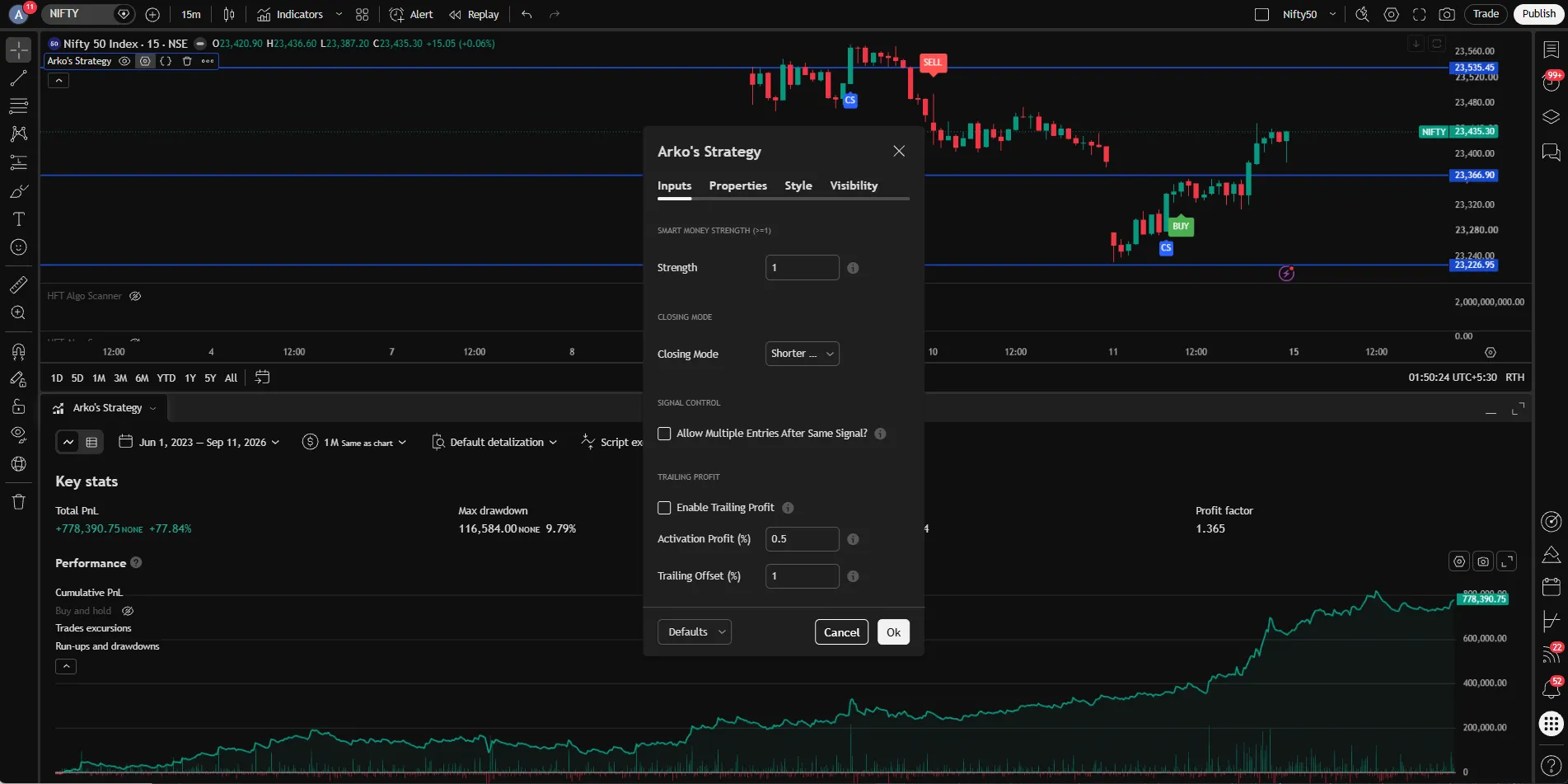
Arko's Strategy on a Nifty chart in TradingView, with its settings window and the Strategy Tester results below the chart.
02 For trading

TradingView indicator

Arko's Strategy Indicator

The indicator version, built for trading and automation. A clean chart with Buy, Sell, Close Long and Close Short signals, and alerts made to drive orders.

  • The same signals as Arko's Strategy
  • Buy, Sell, Close Long and Close Short alerts, built for automation
  • Invite only access on your TradingView account
Read the full guide
A clean Nifty 50 chart in TradingView with Buy, Sell, Close Long and Close Short labels on the candles.

Every indicator and strategy

8 published on TradingView. Each has its own guide.

Where it runs

Questions

Questions

Do you give trading tips or calls?
No. We are not SEBI registered and do not make recommendations. The scripts are tools for your own analysis.
Do I get the source code?
No. The scripts are invite only and the code stays private.
Can I use it on more than one device?
Yes. Access is tied to your TradingView account, so it works wherever you log in.
Can I upgrade my plan?
Yes, within the first month of your plan. Email or WhatsApp us and we will help.
Is there a monthly plan?
Only for Vyuh. The indicator plans run for longer periods instead: a longer term keeps the price of each plan lower than monthly billing would. See the plans and pricing page.
See plans and prices